Behind the Scenes: How I Manage Calendars for Busy Entrepreneurs (Without the Chaos)
Calendar management for entrepreneurs isn’t just about scheduling — it’s about protecting your time, your focus, and your ability to scale.

My Step-by-Step System for Preventing Double-Bookings, Protecting Focus Time, and Eliminating Scheduling Stress
EXCERPT: Calendar management sounds simple until you’re juggling time zones, last-minute changes, and competing priorities. See exactly how I keep my clients’ schedules organized and stress-free.
Your Calendar Controls Your Life. And Right Now, It’s Controlling It Badly.
You have three meeting requests in your inbox.
A client wants to reschedule tomorrow’s call.
You forgot to block time for that project due Friday.
And you just double-booked yourself. Again.
Your calendar was supposed to help you manage time. Instead, it’s creating constant stress and interruptions. You’re so busy coordinating when things happen that you barely have time to actually do them.
This isn’t a time management problem. It’s a calendar management problem.
In this article, I’m breaking down exactly how I manage calendars for busy entrepreneurs—the systems, the strategies, and the small details that prevent chaos and protect productivity.
What This Article Covers
- Why DIY calendar management is costing you more than you realize
- My proven system for preventing scheduling conflicts and chaos
- How to protect time for deep work while staying accessible
- Real examples of calendar challenges and how I solve them
The Core Problem: Your Calendar Is Working Against You
Poor calendar management for entrepreneurs often leads to mental fragmentation, decision fatigue, and constant context switching.
Most entrepreneurs think calendar management is simple: just put meetings on the calendar.
But here’s what actually happens:
You schedule a call for Tuesday at 2 PM. But you forgot about the webinar you registered for at the same time. Now you’re rescheduling, which requires 6 back-and-forth emails. The person wanted Tuesday specifically because they’re traveling Wednesday. So you suggest Thursday. They counter with Friday morning. You forget you blocked Friday mornings for focused work. Now you’re choosing between your commitment to deep work or disappointing a potential client.
This happens multiple times per week.
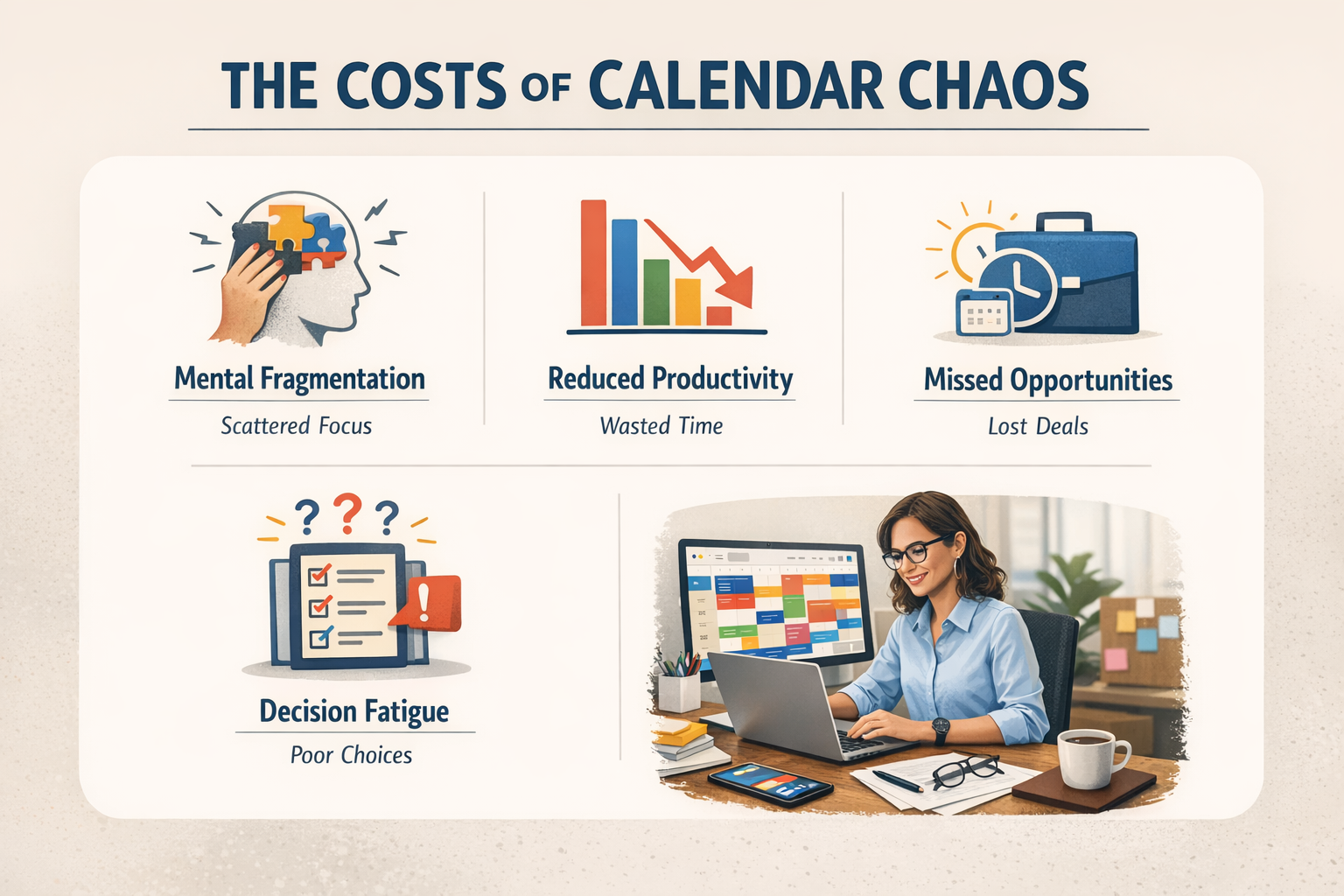
The real cost of calendar chaos isn’t just the time spent scheduling. It’s:
Mental fragmentation: Constant context-switching between tasks and coordination Reduced productivity: No protected blocks for deep work Missed opportunities: Saying no to valuable meetings because your calendar is a mess Professional image: Looking disorganized when you have to reschedule repeatedly Decision fatigue: Constantly evaluating schedule trade-offs instead of doing actual work
When your calendar is chaotic, everything else becomes harder.
Research from the American Psychological Association shows that switching between tasks can reduce productivity by up to 40%. This is exactly what happens when your calendar doesn’t protect your focus. https://www.apa.org/research/action/multitask (apa.org in Bing)
How Professional Calendar Management Actually Works
Calendar management isn’t just data entry. It’s strategic time protection.
When I manage a client’s calendar, I’m not just adding meetings. I’m implementing a system that:
Protects their most valuable time: Deep work blocks are sacred and clearly marked Prevents scheduling conflicts: I check all calendars before confirming anything Manages communication proactively: I handle all coordination so they never see the back-and-forth Adapts to changing priorities: I can shift things quickly without creating cascading chaos Maintains professional boundaries: Buffer time between meetings, reasonable working hours, and actual breaks
The goal isn’t just an organized calendar. It’s a schedule that supports productivity instead of destroying it.
My Calendar Management System (Step-by-Step)
A structured approach to calendar management for entrepreneurs creates clarity, protects deep‑work time, and reduces scheduling chaos.
Here’s exactly how I keep my clients’ calendars organized and stress-free.
Step 1: Initial Calendar Audit & Strategy
Before managing anything, I need to understand:
Current time usage: What’s actually consuming their calendar now? Ideal schedule structure: When do they do their best work? When do they need breaks? Meeting types: What requires their personal attention vs. what could be delegated? Priorities: What activities deserve calendar protection? Boundaries: What hours are off-limits? What constitutes an emergency?
Then I create a calendar template that includes:
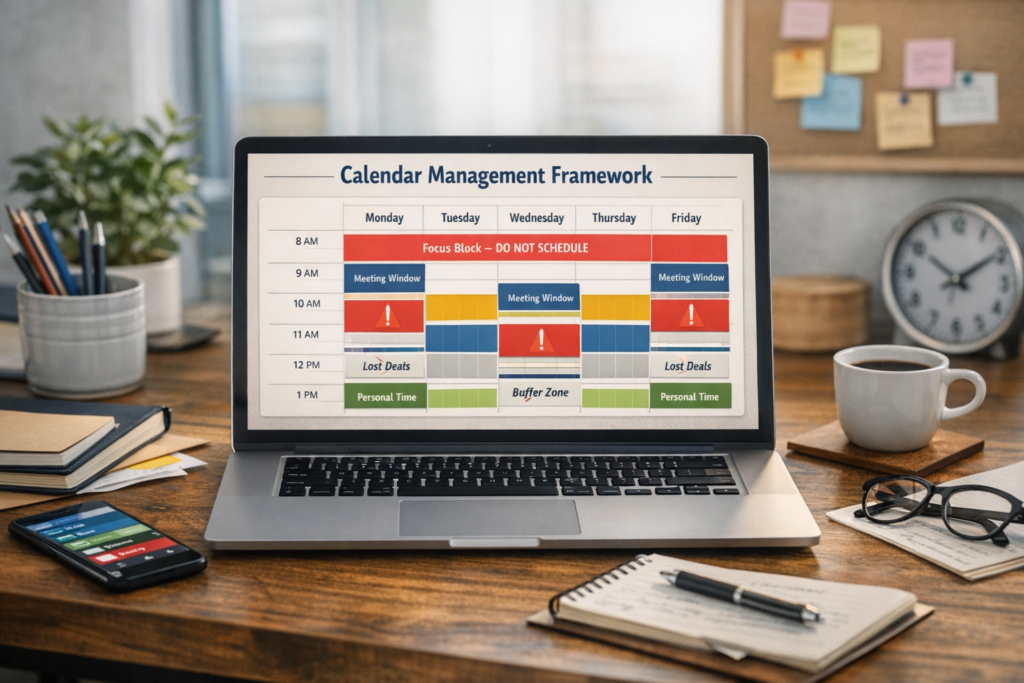
- Focus blocks: Protected time for deep work, clearly labeled “DO NOT SCHEDULE”
- Meeting windows: Designated times when external meetings can happen
- Admin time: Blocks for email, planning, and operational work
- Buffer zones: 15-30 minutes between meetings for transitions and notes
- Personal boundaries: Family time, exercise, or other non-negotiable commitments
This isn’t rigid. It’s a framework that brings intention to what’s otherwise reactive chaos.
Step 2: Centralized Scheduling System
I consolidate all calendar access and scheduling tools in one place:
Primary calendar: Usually Google Calendar with full edit access Scheduling tools: Calendly, Acuity, or similar set with proper availability rules Communication channels: Clear process for how scheduling requests reach me Backup calendars: Personal or family calendars that need to be checked for conflicts
Everything funnels through me. The client never sees scheduling coordination. They just see the final, optimized schedule.
Step 3: Proactive Meeting Coordination
When a meeting request comes in, here’s my process:
1. Check all calendars for conflicts Not just the primary work calendar—personal commitments, existing holds, travel plans.
2. Verify meeting type and priority Does this align with their goals? Is it worth displacing protected focus time?
3. Propose optimal timing Consider time zones, energy levels (no hard thinking at 4 PM if they’re a morning person), and buffer time.
4. Confirm all details Meeting platform link, agenda if needed, preparation materials, time zone clarification.
5. Send calendar invite with complete information Not just “Call with John.” Include: meeting purpose, video link, phone backup, any pre-work, and relevant context.
6. Set reminders strategically 24-hour advance notice for preparation, plus 15-minute reminder with relevant notes.
The client doesn’t coordinate any of this. They just show up to meetings that make sense and are properly prepared.

Step 4: Conflict Prevention and Buffer Management
The secret to calendar management isn’t just adding meetings. It’s preventing the problems that create stress.
Time zone management: I verify everyone’s time zones before confirming meetings. I use tools like World Time Buddy to prevent 6 AM wake-up calls.
Buffer time protection: No back-to-back meetings unless absolutely necessary. Everyone needs 15-30 minutes to process one call before starting the next.
Travel considerations: I account for commute time, airport security, time zone changes, and recovery time after long flights.
Energy management: No calls before morning routines are complete. No mentally demanding meetings right after lunch when energy dips. No late calls that eat into family time.
Realistic expectations: A “quick 30-minute call” needs 45 minutes on the calendar (prep + call + notes). I build in reality, not optimistic fantasy.
Step 5: Last-Minute Changes and Crisis Management
Despite perfect planning, things change. My job is absorbing the chaos so it doesn’t touch the client.
When someone needs to reschedule:
- I review available alternative times immediately
- I propose 2-3 options that work with their schedule
- I handle all coordination with zero involvement from the client
- I update calendar invites and send confirmations
When conflicts arise:
- I assess which meeting is higher priority
- I proactively reach out to reschedule the lower-priority item
- I provide the client with a brief explanation and the resolution
- I document why the conflict occurred to prevent future similar issues
When opportunities emerge:
- I evaluate whether it fits their strategic priorities
- I identify what could be moved or shortened to accommodate it
- I present the trade-off clearly: “This opportunity requires moving X. Should we proceed?”
- I execute whatever decision they make immediately
The client makes strategic decisions. I handle all the operational execution.
Step 6: Weekly Planning and Review
Every Sunday evening (or Monday morning), I:
Review the upcoming week:
- Confirm all meetings are still accurate
- Check for preparation needs
- Identify any scheduling issues before they become problems
- Add buffer time if the week looks too packed
Send a weekly overview: Brief email with the week’s schedule, any preparation needed, and flagged items requiring attention.
Adjust as needed: If I see three high-stress calls in one day, I suggest rearranging. If focus time is getting crowded out, I protect it proactively.
This weekly rhythm prevents surprises and maintains the integrity of their schedule.
If you want to explore the time‑blocking method in more depth, Todoist offers a clear and practical overview that works well even for highly dynamic schedules.
https://todoist.com/productivity-methods/time-blocking(todoist.com in Bing)
Real Calendar Management Challenges (and Solutions)
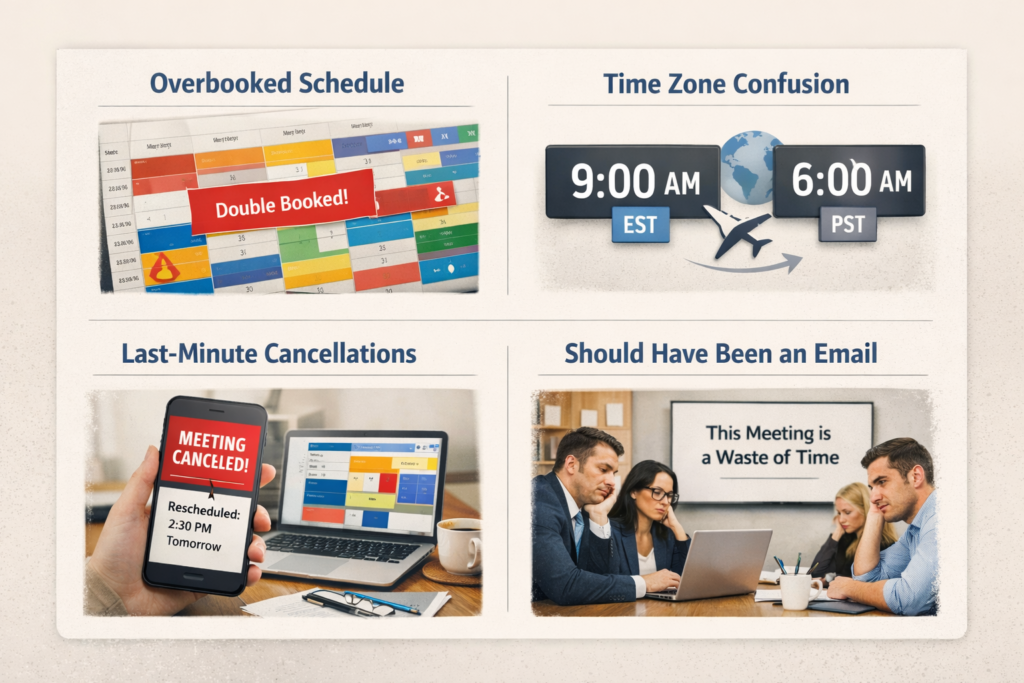
Challenge 1: The Client Who Over-Commits
Scenario: They say yes to every opportunity and their calendar becomes impossible.
Solution: I implement a “maximum meetings per day” rule. Before accepting new meetings, I flag how many they already have and ask which existing commitment should move. This forces conscious trade-offs instead of calendar Tetris.
Challenge 2: The Time Zone Confusion
Scenario: International clients leading to 6 AM calls or midnight meetings.
Solution: I create “scheduling windows” that work across time zones. For US/Europe calls, that might be 8-11 AM EST. For US/Asia, early morning or late evening blocks are designated and protected so they’re not happening randomly.
Challenge 3: The Last-Minute Cancellation Domino Effect
Scenario: One person cancels, creating a gap. Now the schedule looks Swiss cheese.
Solution: I maintain a “flex list” of tasks that could use dedicated time. When gaps appear, I suggest: “Sarah cancelled. Would you like to use this block for X project, or should I find a replacement meeting?”
Challenge 4: The Meeting That Should Have Been an Email
Scenario: Low-value meetings consuming calendar space.
Solution: I screen meeting requests. If the purpose could be handled via email or async communication, I suggest it. “Would a quick email update accomplish this, or is real-time discussion necessary?”
Challenge 5: The No-Show
Scenario: Someone doesn’t show up for a scheduled meeting.
Solution: I send confirmation emails 24 hours ahead and 2-hour reminders. If someone no-shows, I immediately follow up to reschedule and document the occurrence. Patterns indicate who needs extra reminders.
What Gets Managed vs. What Reaches You
I handle completely:
- Routine meeting scheduling
- Coordination across multiple participants
- Time zone calculations
- Calendar invite creation and updates
- Rescheduling conflicts
- Meeting reminders and confirmations
- Platform link generation
- Travel time blocking
I flag for your input:
- High-priority meeting conflicts (which should stay?)
- Opportunities that require strategic decision
- Requests outside your normal availability
- Meetings with unclear purpose or value
You handle directly:
- Showing up to meetings I’ve scheduled
- The actual content and participation
- Strategic decisions about your time
The division is clear: I manage the system. You use the system.
Practical Benefits for Small Business Owners
Time savings: Most clients save 3-5 hours per week previously spent on scheduling coordination.
Better organization: A well-managed calendar reduces missed meetings, double-bookings, and scheduling stress.
Reduced mental load: Knowing someone is protecting your time and handling coordination removes constant background anxiety.
Improved accuracy: Professional calendar management means fewer errors, clearer communication, and better meeting preparation.
Tasks You Can Outsource Today
Calendar management is just one administrative area where virtual assistant support makes a massive difference.
Other delegation opportunities include:
Email management: Inbox organization, routine responses, and priority filtering Meeting coordination: Not just scheduling but agenda preparation and follow-up Travel planning: Flights, hotels, ground transportation, and detailed itineraries Client communication: Updates, check-ins, and routine correspondence Administrative support: Data entry, document organization, and CRM maintenance
Want to see a complete breakdown? Download the free guide: 40 Tasks You Can Delegate Today and identify where you’re spending time unnecessarily.
How to Start Working With a VA (Step-by-Step)
Step 1: Track your scheduling time for one week. How many emails do you send coordinating meetings? How often do conflicts arise? This reveals the real cost.
Step 2: Document your ideal schedule structure. When do you do your best work? What boundaries matter most? Create a rough framework.
Step 3: Start with partial delegation. Give your VA scheduling authority for specific meeting types first. Expand as trust builds.
Step 4: Establish clear communication. How will scheduling requests reach your VA? What requires your approval vs. their independent judgment?

Final Thoughts
Your calendar should support your productivity, not sabotage it.
When calendar management is handled professionally, your schedule becomes a tool that protects your time instead of consuming it.
You stop playing scheduling Tetris and start showing up to well-planned meetings with time to prepare, think, and do your actual work.
The entrepreneurs who scale successfully aren’t the ones doing their own scheduling. They’re the ones who’ve built systems that handle it for them.
Ready to identify all the tasks consuming your time? Download the 40 Tasks You Can Delegate Today checklist and see exactly where calendar management fits in your delegation strategy.
Next Step
And if you’re looking for more than a checklist — if you’re ready for real operational support — here’s your next step.
You don’t have to manage your calendar, your workflow, or your time alone. When you have the right systems — and the right support — everything becomes lighter, clearer, and far more strategic.
If you’re ready to stop fighting your schedule and start operating with clarity, structure, and ease, I’d love to help you get there.
Book a discovery call and let’s explore how we can work together to build the operational foundation that truly supports your growth.